
Some links on this page are affiliate links: if you sign up through them, we may earn a commission at no extra cost to you.
This page introduces Forex Tester, the manual backtesting software NatureLaw Research has chosen for replaying past markets, and the functions it provides for research: historical data, a simulated account, testing modes, trading tools, statistics and automated testing, plus the differences between the desktop version and Forex Tester Online. It is for traders who want to know what Forex Tester backtesting involves before reading the upcoming studies that use it. It describes a tool from its official pages: it is not investment advice and not a recommendation to trade.
The versions, the data packages and their terms are on the official Forex Tester website; the button opens it.
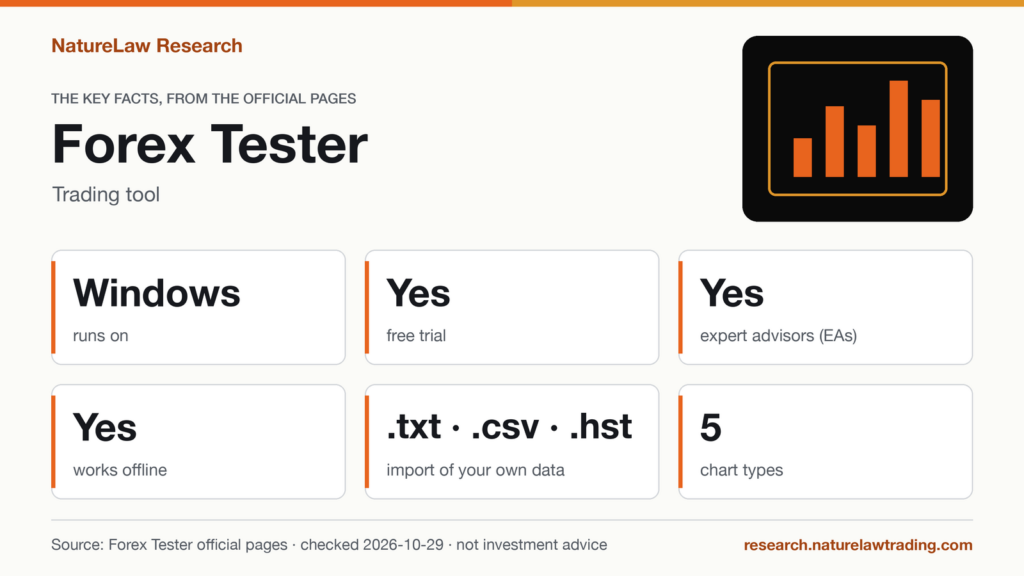
Forex Tester backtesting: the key facts
| Item | Forex Tester desktop (official pages) |
|---|---|
| What it is | Independent software (not a trading platform) that simulates trading on historical data, for manual and automated tests |
| Runs on | Windows; no Mac version (Windows in a virtual machine) |
| Internet connection | Works offline; the Internet is needed to download data |
| License | License Forex Tester (One-time payment, unlimited usage) |
| Packages (order page) | Forex Tester and Basic Data · Forex Tester and monthly Super Data Subscription · Forex Tester and annual Super Data Subscription · Forex Tester and Lifetime package Super Data |
| Free data, EURUSD | May 2003 – 09/30/2026 |
| Super Data | 860 symbols, 1-minute and tick data of high and premium quality, floating spread, daily updates, historical news for 9 currencies (AUD, CAD, CHF, CNY, EUR, GBP, JPY, NZD, USD; high, medium and low priority) |
| Own data import | .txt, .csv and .hst files |
| Simulated balance at the start | 10,000 USD, changeable with “Change Balance” on the Order tab |
Prices are not listed here: on the check date the order page showed a seasonal promotion. The Super Data symbol count is the one stated on the order page.
Checked against the official Forex Tester pages on 2026-10-29.
What manual backtesting software does
Manual backtesting means trading a set of rules by hand on past data, one decision at a time, without seeing the bars that come next. A forex simulator for backtesting hides the future, moves the market forward, fills simulated orders and keeps the statistics, so that a discretionary method can be checked trade by trade without first writing it as code.
Forex Tester is built for this job, and the vendor states that it is independent software, not a trading platform: it does not connect to a broker and places no real orders. That is why NatureLaw Research has chosen it for the manual side of its backtesting. It will come up in many upcoming articles, mainly in its desktop version.
NatureLaw Research takes part in the Forex Tester affiliate program: this is the relationship the disclosure at the top of the page refers to. It does not mean that Forex Tester endorses or reviews the content of this site.
How Forex Tester backtesting works on desktop
Historical data
Basic Data comes with the license and covers the main currency pairs; Super Data is a paid subscription that adds tick data, floating spread and many more symbols. Own data can be imported as .txt, .csv or .hst files, and the FAQ notes that it is recommended to import 1-minute bars for accurate testing, but the program will work well with any timeframe. The terms add: All downloaded data is stored on your computer and remains valid for use after the subscription expires. The free data table describes its series as Price: Bid · Time: GMT (no Daylight Saving Time) · source Basic (Forexite free data).
The simulated account
A test starts with 10,000 USD of virtual deposit, which can be changed, and the features page lists the settings that bring the simulation closer to a given broker: spread, leverage, swaps, initial balance, minimum distance to price, digits after profits, margin, hedged margin, lot size, simulated deposits and withdrawals, and broker commission. Costs set too low make a manual result look better than it would have been.
Testing modes
- Ordinary mode: step back by one bar and change the trading decision. Useful for practice, but stepping back is a form of hindsight.
- “Forward testing only”: no stepping back. Every decision stays as it was made, closer to real-time trading.
Trading on the replayed chart
The chart area shows any number and combination of charts of various pairs and time frames, synchronized, as Japanese candlesticks, bars, range bars, lines and Heikin Ashi, with Renko charts, custom timeframes and built-in indicators. For sizing and exits there are risk as a % of equity per trade with automatic lot size, a Reward-to-Risk tool on the chart, and trailing stops. News can be part of the test: a historical news service shown on the chart; only USD-related high-priority news with Basic data, 9 currencies with high, medium and low priorities with Super data.
Statistics
The result of a session is in the numbers, not in the memory of the trades: automated trading statistics (profitable and losing trades, drawdowns, max drawdown, consecutive wins and losses and more), profit chart (balance, equity, margin, drawdown), export of statistics, trading history and profit chart to Excel. A manual backtest is a hypothetical result: it shows how a set of rules would have been traded on past data, under the costs set in the simulation, and says nothing certain about the future.
Automated testing and the Strategy Optimizer
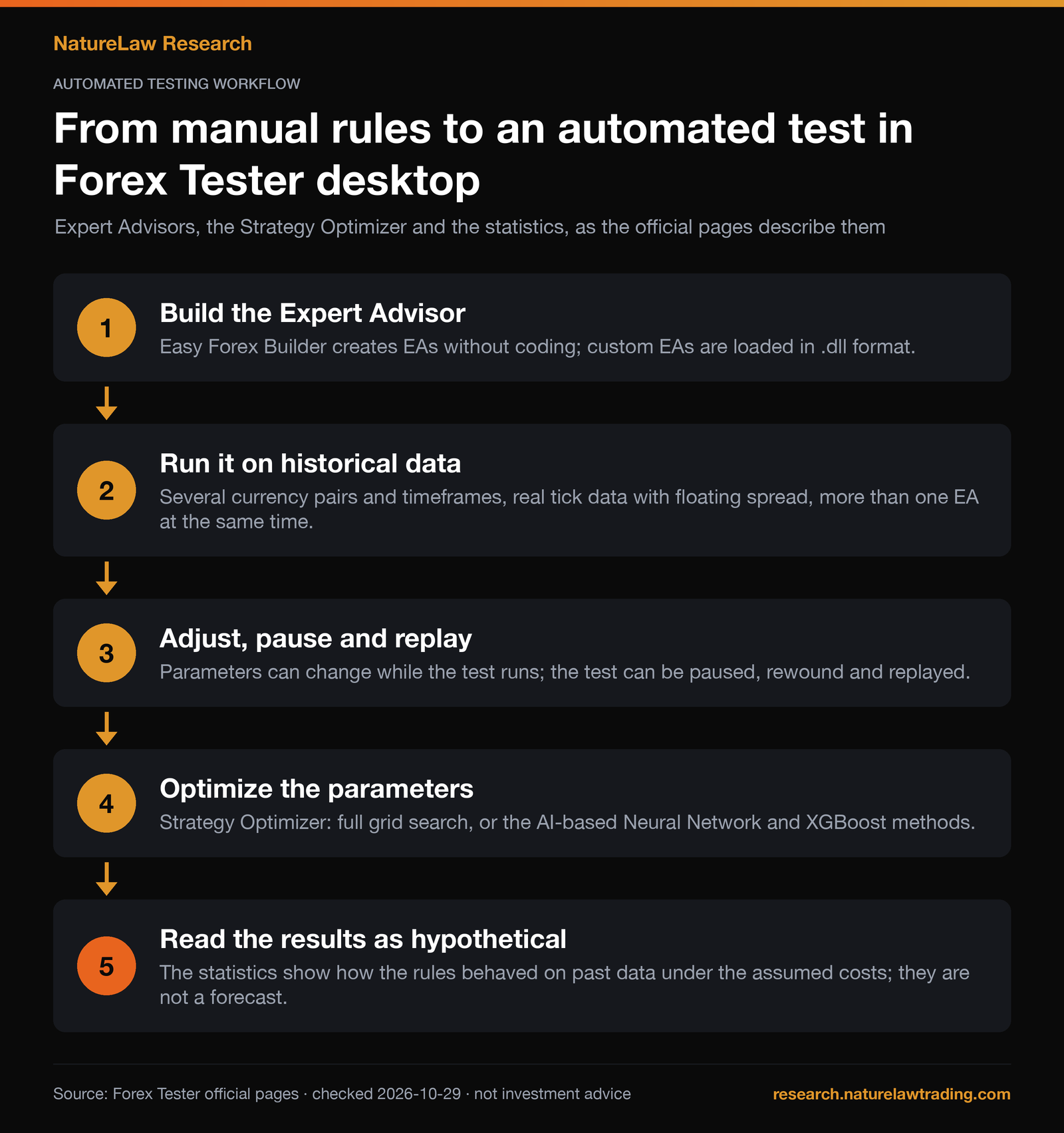
The same software tests Expert Advisors (EAs): built-in examples, custom EAs in .dll format, or EAs made without coding in Easy Forex Builder, a separate tool included for buyers. An EA can run on several pairs and timeframes, on real tick data with floating spread, next to other EAs, and manual and automatic trading can be combined. The Strategy Optimizer searches an EA’s parameters with a full grid, available even without a paid data subscription, or with the AI-based Neural Network and XGBoost methods. Optimized parameters fit the past by construction, so an optimized result needs unseen data before it means anything.
The demo version
The download page describes a free demo version, “No Credit Card Required”; download after sign-in with Google or Microsoft or via an emailed link. Limits vs the full version:
- 1 month of historical data (April, 2018),
- 1 hour of uninterrupted testing,
- projects cannot be saved,
- historical news only for USD,
- Easy Forex Builder not available,
- Strategy Optimizer full grid on 1 month of data,
- first 10 lessons of the interactive courses;
“All other features are the same as in the full version”. No time limit is stated.
What the numbers mean in bars
A forex chart prints about 120 one-hour bars a week (24 hours, 5 days). The free EURUSD series spans about 23 years and 5 months: roughly 146,000 one-hour bars, 36,600 four-hour bars or 6,100 daily bars (approximate, holidays ignored). In a manual test every bar is a moment to look at, so the timeframe decides the workload: a year of one-hour data is about 6,200 bars, a year of daily data about 260.
The demo month has 21 weekdays, about 500 one-hour bars: enough to learn the controls and the testing modes, not enough for a sample of trades on a daily chart, where the same month is about 21 bars.
GMT without Daylight Saving Time matters for session rules. The London open, 08:00 local time, is 08:00 GMT in winter and 07:00 GMT in summer, so on this data “enter at the London open” means a different bar in the two halves of the year.
Forex Tester Online vs desktop
Forex Tester exists in two versions with two websites. Every page of the desktop site carries a banner that calls it the page of the old version of the product and points to Forex Tester Online (FTO), which the desktop site describes as “available online on any device”.
| Item | Forex Tester desktop | Forex Tester Online (FTO) |
|---|---|---|
| Website | desktop.forextester.com | forextester.com |
| Runs on | Windows (Mac through a virtual machine) | Online, according to the desktop site |
| Internet connection | Works offline after the data download | Not checked yet |
| License and plans | One-time license, data packages separate | Not checked yet |
| For the vendor | The old version | The newer product |
The pages of forextester.com could not be read on October 29, 2026: the site returned an automated security check instead of the page. This page therefore does not describe the plans, the trial or the functions of Forex Tester Online; they will be added once checked on the official pages.
What Forex Tester does and does not do for research
What it does
- Replays historical data with the future hidden, for manual tests, automated tests and combinations of the two.
- Simulates the costs a test depends on: spread, commission, swaps, leverage and margin.
- Records every trade and produces statistics and an equity curve, exportable to Excel.
What it does not do
- It does not trade: the vendor’s affiliate rules state that Forex Tester is not a brokerage company or a platform.
- It does not turn a backtest into a forecast.
- On desktop it does not run natively on a Mac: there is no Mac version of the software for now, and the vendor suggests checking a virtual machine before buying.
- It does not tell anyone what to trade, and nothing on this page does.
Details to check before reading a result
- Data. Tick data and floating spread come with Super Data; on Basic Data the spread is the one set in the simulation.
- Mode. A test in ordinary mode may contain decisions changed after stepping back; “Forward testing only” rules that out.
- Costs. Spread, commission and swaps are inputs, and the result depends on them.
- Time zone. The free data is in GMT without Daylight Saving Time.
- Vendor material. The official pages show sample results and optimizer accuracy figures; they are the vendor’s and are not repeated here.
What’s next on NatureLaw Research
Upcoming articles will show these functions at work, one at a time: writing a manual method as rules before the test, setting up the simulated account, running a session in forward-only mode and reading the statistics. Those pages will describe what was actually done, with dates, the evidence on file and the limits of a single test.
Where to start
The versions, the data packages and the current prices are on the Forex Tester website. The demo of the desktop version is described on the download page of desktop.forextester.com.
FAQ
How do you use Forex Tester?
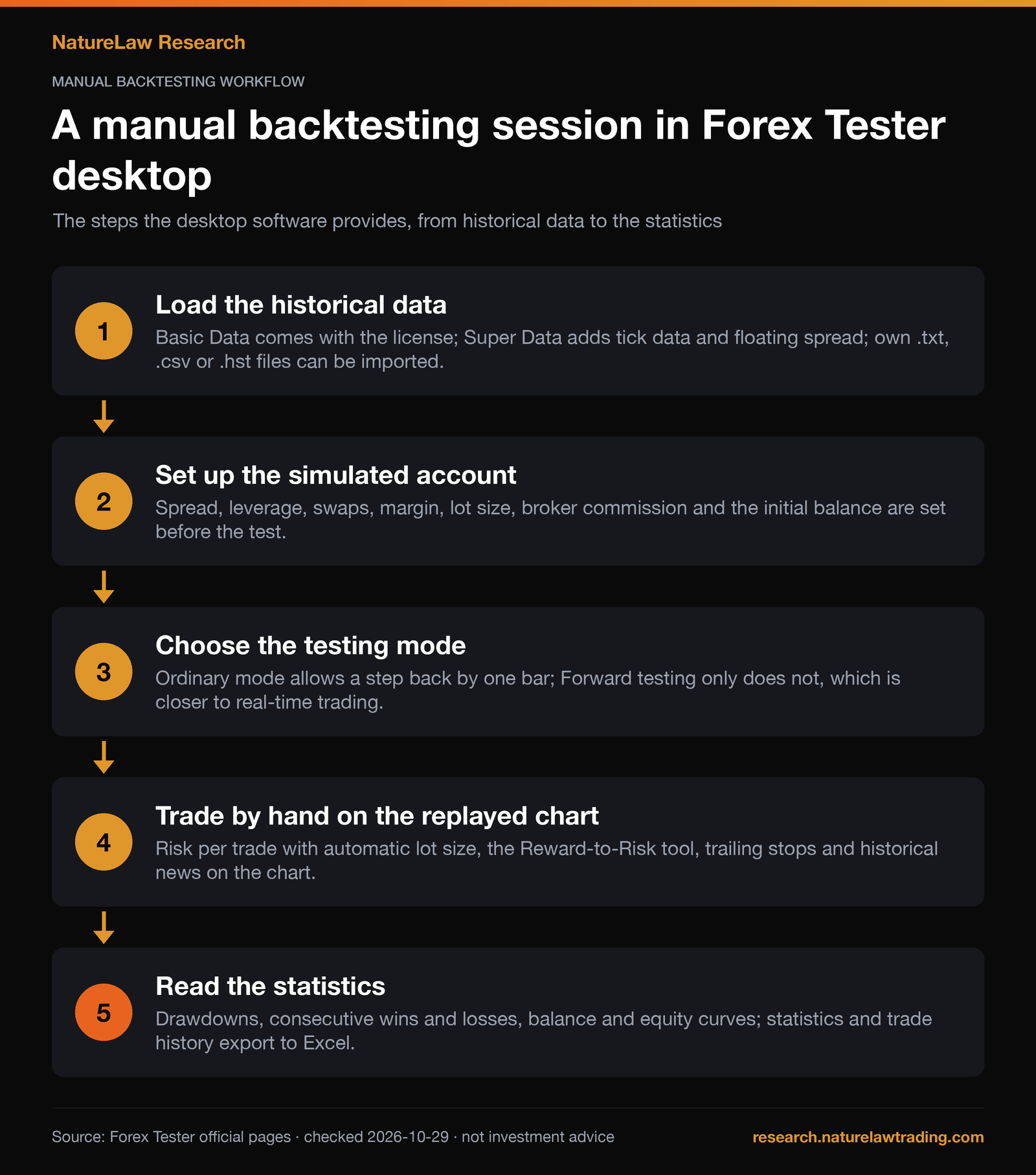
A manual session follows the steps of the first chart above: download or import the data, set the simulated account, choose the testing mode, move the chart forward and place trades by hand, then read the statistics and the trade history.
What is the difference between Forex Tester Online and desktop?
The desktop version is Windows software that works offline once the data is downloaded, sold with a one-time license plus data packages. Forex Tester Online runs online and is the product the vendor now points to; its plans and functions were not checked for this page.
Can Forex Tester be used for manual backtesting trading strategies?
Yes, manual testing is its main use: trades are placed by hand on a chart that moves through past data. EAs, and strategies that combine manual and automatic trading, can be tested as well.
Does Forex Tester work on Mac?
The desktop version runs on Windows. On a Mac the FAQ points to a virtual machine (Parallels Desktop or VMWare Fusion) with Windows installed.
Is Forex Tester a trading platform?
No. It is backtesting and simulation software: it fills simulated orders on historical data and does not connect to a broker.
From the replay to the lab
NatureLaw Research is the research blog of Nature Law, a lab that develops quantitative tools built on the principles professional desks use, adapted for private traders. Manual backtesting in Forex Tester is one part of that project. To see what the lab builds, visit naturelawtrading.com (opens in a new tab).
Sources
- Forex Tester, Home (desktop site), https://desktop.forextester.com/, checked October 29, 2026.
- Forex Tester, Features, https://desktop.forextester.com/features, checked October 29, 2026.
- Forex Tester, Download, https://desktop.forextester.com/download, checked October 29, 2026.
- Forex Tester, Order, https://desktop.forextester.com/order, checked October 29, 2026.
- Forex Tester, FAQ, https://desktop.forextester.com/faq, checked October 29, 2026.
- Forex Tester, Data sources, https://desktop.forextester.com/data/datasources, checked October 29, 2026.
- Forex Tester, Strategy Optimizer, https://desktop.forextester.com/optimizer, checked October 29, 2026.
- Forex Tester, Terms (EULA and Privacy Policy), https://desktop.forextester.com/terms, checked October 29, 2026.
- Forex Tester, Affiliates, https://desktop.forextester.com/affiliates, checked October 29, 2026.
- Forex Tester affiliate program rules (linked from the Affiliates page), https://docs.google.com/document/d/1DLaCmIKd4wQpR7YPCZN_ofmljbbxL9XwoFGmnI49CcE/edit, checked October 29, 2026.
Written by Stefano Mastria. Features checked against Forex Tester official pages on October 29, 2026.